

Timeline:
3 Months
Tools:
Figma, Canva, Google Forms/Docs
Project Type:
UX103 Course Project
Team:
Aliyah, Emma, Alex
Role/Tasks:
Project Planning, User Research, Usability Testing, Prototyping
Project Overview
The challenge presented to our group focused on creating an experience for User Experience (UX) Design students that teaches them about the design and UX industry. Our goal was to inform and create a meaningful experience for students about UX Careers. We strived to combine knowledge and information in a fun and creative way that appeals to current UX students.

DESIGN CHALLENGE
“How might we provide accessible information about UX careers for first-year UX students?”
PROJECT PROCESS
PLAN
-Concept Statements
-Milestone Calendar
-Content Ideation
SYNTHESIZE
-User Personas
-User Stories
-Jobs to be Done
-Journey Mapping
TEST & DESIGN
-Usability Tests
-Satisfaction Testing
-Figma App Screens
PROTOTYPE
-Sketches
-Paper Prototypes
-Wireframes
-Interactive Prototypes
RESEARCH
-Online Surveys
-User Interviews
-Secondary Research
PROJECT GOALS
Goal A:
Gain a stronger understanding of how much Laurier UX students are aware of UX careers and pain points they face using current systems
Goal B:
Understand and learn the most popular or top UX careers students want to purse
Goal C:
Gain a better understanding of why students are interested in pursuing a UX career
Goal D:
Learn what information students look for when considering a job/career and their motivation factors

MEET OUR USERS
Based on our research findings and insights from user interviews, we created two user personas. Using our personas, we created a user story and jobs to be done for each persona.
MEET OLIVIA SMITH
Olivia is our main user persona who is interested in exploring her options in the UX industry as a young first-year UX student.


Olivia needs to learn about the UX industry while gaining a better understanding of her personal skills and strengths.
OLIVIA'S STORY
MEET
JALEN ANDREWS
Jalen is our second user persona who is interested in finding a job or career in UX as an older first-year UX student.


JALEN'S STORY
Jalen needs to utilize a degree and education in UX design while understanding the best location for job availability.
JOURNEY MAPPING
Using our user personas, research data, and online survey feedback, we created a journey map that illustrates how our users would find information about UX careers.

RESEARCH REPORT
Before moving on to the prototype and ideating phase, we created a report which describes our research methods and why we chose them. Included is how we did the research, the participants that were involved, and what questions were asked. Our results of the research and how these results will influence our design process are thoroughly explained.
STYLE GUIDE
Our visual guide features our colour palette, typography, icons, and logo to create consistency. and unity in our overall design. The colour palette features high contrasting tones to create a dark and light-themed interface. The typography is a sans serif minimal and simple font. Our icons are rounded to create a fun and soft visual appearance. The logo illustrates a globe with a paintbrush to incorporate our app name, UX World.

SKETCHES
The prototype process began with simple hand-drawn digital sketches. These sketches illustrated the main screens and user flows that helped to plan the information architecture and layout.


WIREFRAMES
The second phase of prototyping was creating low-fidelity digital wireframes. These included basic shapes and titles but no content or copy/text.


LOW FIDELITY PAPER PROTOTYPES
The next step was creating physical low fidelity paper prototypes using construction paper, glue, and markers. Similar to the wireframes, the paper prototypes helped to visualize our app design.


USABILITY TESTING & PLANNING
The purpose of our usability plan is to ensure that our experience is meeting user needs. Focusing on formative evaluation, our usability tests will help us move through and develop through the design thinking process. These tests will suggest design changes and refinements to help direct our prototypes. Our overall goal is to create an experience that answers the question, “How might we provide accessible information about UX careers for first-year UX students?”
USABILITY TEST GOALS
Goal A:
Ensure users can identify clickable/unclickable interactions
Goal B:
Where users go to find information or how they search
Goal D:
Understand where are users experiencing difficulties and how they find help
OBJECTIVIES:
-
Identify usability issues
-
Capture and measure performance metrics
-
Find error frequencies
-
Improve user satisfaction
-
Increase effectiveness and efficiency
-
Improve information architect
-
Plan and develop user flows
-
Identify design changes and refinements
UX WORLD APP
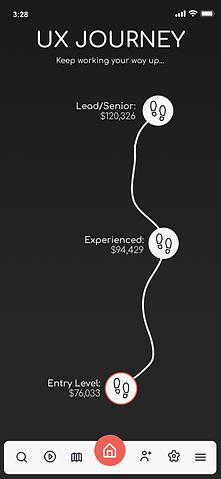
The final design of our app was created using Figma. The two usability experiments on our prototypes helped to achieve our user needs and goals. The feedback, comments, and insights from participant data were able to help us further develop our experience and move through the design thinking cycle/process.




KEY TAKEAWAYS & USABILITY REPORT
The purpose of conducting usability tests on our prototypes was to ensure that our experience is meeting user needs and creating a meaningful experience. The experiments were designed to help guide our low to high fidelity prototype designs, ideation, and creation. The usability tests helped to provide design changes/refinements and identify user issues or errors.